
Overview
Payment links created on the Novac dashboard are reusable by default, you can share a single link with multiple customers and receive funds from each of them. This works well for general-purpose payment pages, but there are scenarios where you need more control.When you want to tie a checkout payment to a specific payment link, for example, to handle a one-time purchase, pre-fill customer details, or customize the checkout experience per transaction, you should initiate the checkout via the API instead.
paymentLinkReference from your dashboard and use it to create a checkout payment via the API.
Prerequisite
See details
See details
To get started you must have completed all the following item on the list below:
- Create a merchant account - Ensure that you have created an account and completed KYC.
- Obtain API keys - Required to authenticate with the Novac API.
- Create a payment link - You need an existing payment link to reference when initiating the checkout.
Create a Checkout Payment with Payment Link Reference
Creating a checkout payment with payment link reference via API allows you to further customize the experience for your customer. Every single payment link created on the dashboard comes with a unique Payment Link Reference, also known as thepaymentURL. You can also see this as initiating a transaction via a payment link reference, and it can be used for a one-time payment.
Finding your Payment Link Reference
You can find this reference by viewing the details of any payment link on your dashboard. Click on a single payment link from the list to view its details: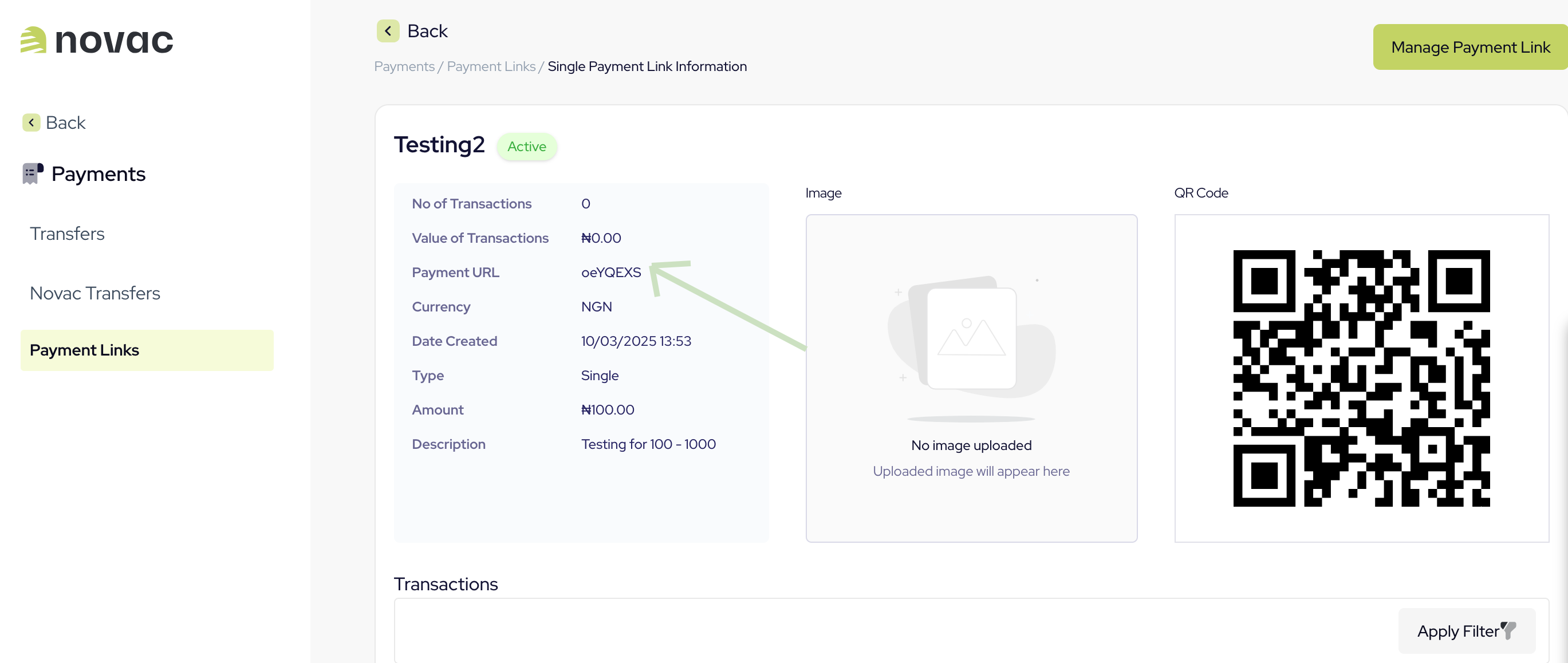
Request
You can control which payment channels appear at checkout by passing
allowedPaymentOptions in your request. Accepts a single value or multiple comma-separated values, e.g. "CARD" or "CARD,PWBT,OPAY,USSD,PALMPAY,MOMO". Learn more about setting payment preferencesResponse
paymentRedirectUrl is used to redirect your customer to where they will complete the payment. It’s important to know that we expose the API that powers our checkout for a custom checkout experience.
What’s next?
Now that you’ve created a checkout payment, here are a few directions to explore:- Split payments: Add a split configuration to your request to automatically distribute incoming funds across multiple settlement accounts, either by flat amount or percentage.
- Complete the payment: Route your customer to the Novac prebuilt checkout to complete the payment, or use the custom checkout to build your own UI on top of our API.