
Overview
If your customer pays with an NGN card, tokenization isn’t available, you’ll instead use the Payment Link Recurring approach, where the customer is charged through a recurring payment link created on the Novac dashboard, with the amount and frequency configured on the link itself.Payment Link Recurring currently supports NGN transactions only. Support for USD and other currencies will be added in a future release.
Prerequisites
See details
See details
Before creating a recurring payment link
- Create a merchant account — Ensure you have an active account with KYC completed.
- Contact support to enable recurring payment link, this feature is enabled based on requests.
To create a recurring payments, follow the steps below.
1
Create recurring Payment Link
A merchant creates a recurring payment link on the Novac dashboard, where the amount and charge frequency are configured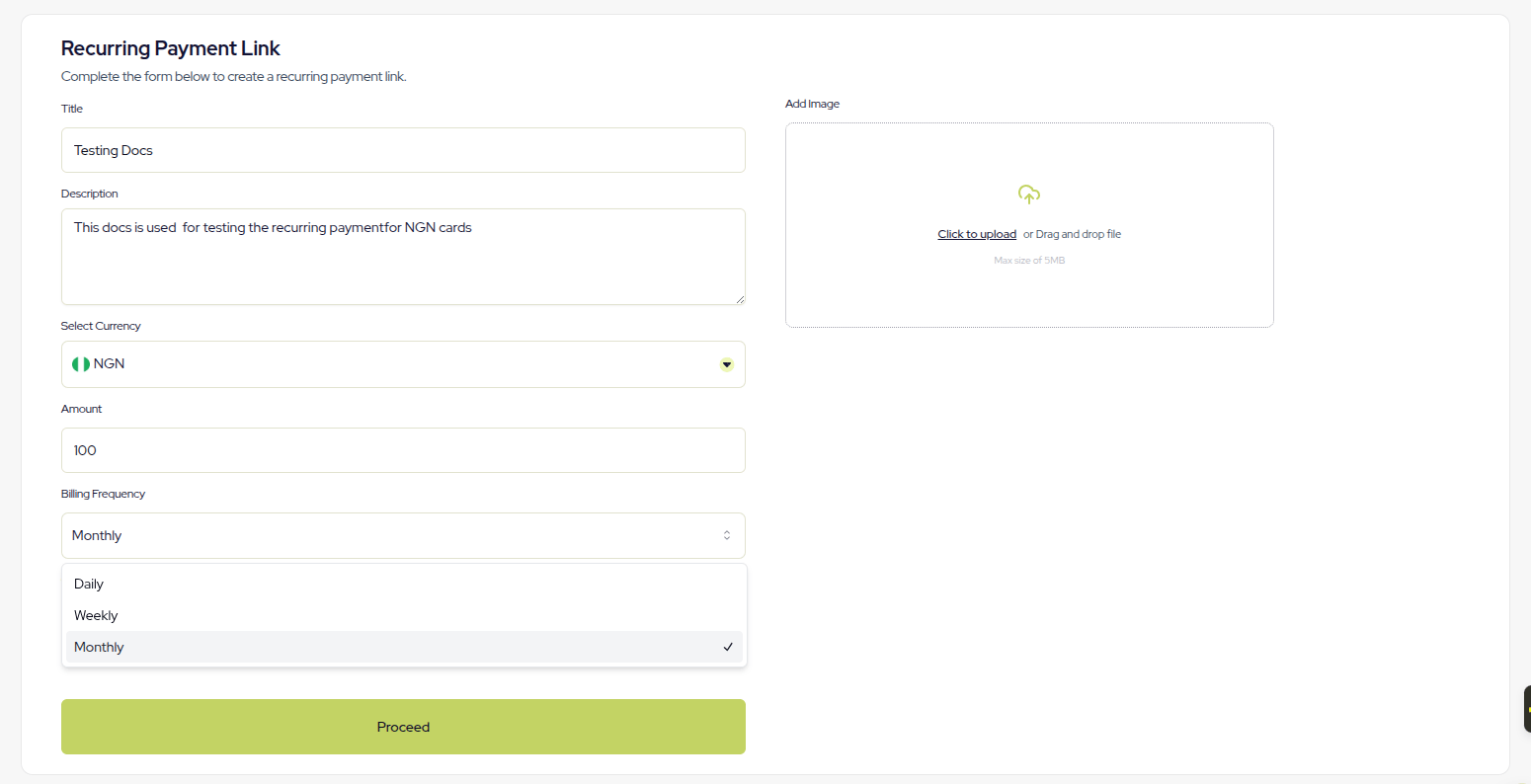
Frequency is not set through the API. It’s configured when the payment link is created on the Novac dashboard.
The
initiate request below only needs the paymentLinkReference.2
Complete Initial Checkout
The customer completes an initial checkout using that link paymentURL. This is what will be passed as
paymentLinkReference. See finding your payment link reference to learn more.3
Novac automate recurring payment when due
Novac automatically charges the customer’s card again at each interval defined by the frequency set on the link. No additional action required from the developer after the first charge.
Initiate a Recurring Payment
Initiates a recurring payment using a recurring payment link reference.Request
Response
Fetch Recurring Payment Details
Fetches the details of a recurring payment using its transaction reference.Request
Response
Make the First Card Charge
Processes the first charge for the recurring payment. Subsequent charges happen automatically based on the frequency configured on the payment link, no further calls to this endpoint are needed for later charges.All fields are required when sending a
POST request to api/v1/recurring/card-payment endpointRequest
Success Response
Verify Charge & Subscription Status
Validates the status of a charge and the underlying subscription.Request
Success Response
Update Subscription Status
Updates the status of a subscription, the status field accept three different type of status flag,pause, reactivate, or cancel.
A
paused subscription can be reactivated by setting its status back to active. Once a subscription is cancelled, it cannot be reactivated.Request
Success Response
What’s Next?
-
Using Webhooks: Automatically receive payment status updates from Novac when a transaction is completed.
Learn how to verify a transaction via webhooks -
Using the Callback URL: Manually verify the payment using the
referenceparameter sent to your callback URL.
Learn how to verify a transaction using a callback reference - Request Refund: Initiate a full or partial refund.